





Employee Status Change Form Template
 7 Downloads
 Company Formation & Governance Documents, Employment Contracts & HR Documents
  March 4, 2025
 FreshDox
Employee Status Change Form Template for HR, Payroll, and Compliance
Every promotion, salary revision, or transfer inside your organization has one thing in common: if it isn’t documented properly, it can lead to payroll errors, compliance risk, and confusion for employees. An employee status change form template gives HR teams a clear, repeatable way to record these updates so nothing falls through the cracks.
Instead of scattered emails and verbal approvals, an employee status change form captures changes in job title, compensation, department, and employment status in a single, standardized document. This helps HR, payroll, and line managers stay aligned, prevents regulatory non-compliance, and provides a clear reference if any dispute arises later.
Whether you are converting a part-time employee to full-time, approving a leave of absence, revising salary, or documenting a rehire, a well-designed employment status change form ensures every update is recorded in the same structured format. This makes internal approvals smoother, data entry faster, and employee records significantly more accurate.
HR departments rely on these forms to meet internal policy requirements, statutory obligations, and audit expectations. From onboarding a new employee to updating benefits eligibility or documenting an exit, an employee change of status form is a critical part of modern human resource management and HR record keeping.
Key Provisions in an Employee Status Change Form
A robust employee status change form template captures all the essential information needed to process employment-related changes without delays or errors. By systematically recording promotions, salary increments, departmental transfers, rehires, and changes in employment status, HR teams can maintain clean records, support compliance with labor laws, and keep payroll aligned with reality.
When changes are not documented with a standard HR status change form, organizations face payroll discrepancies, role misalignment, and administrative inefficiencies. A systematized process simplifies internal approvals, streamlines record keeping, and makes planning for headcount and budgeting much more precise.
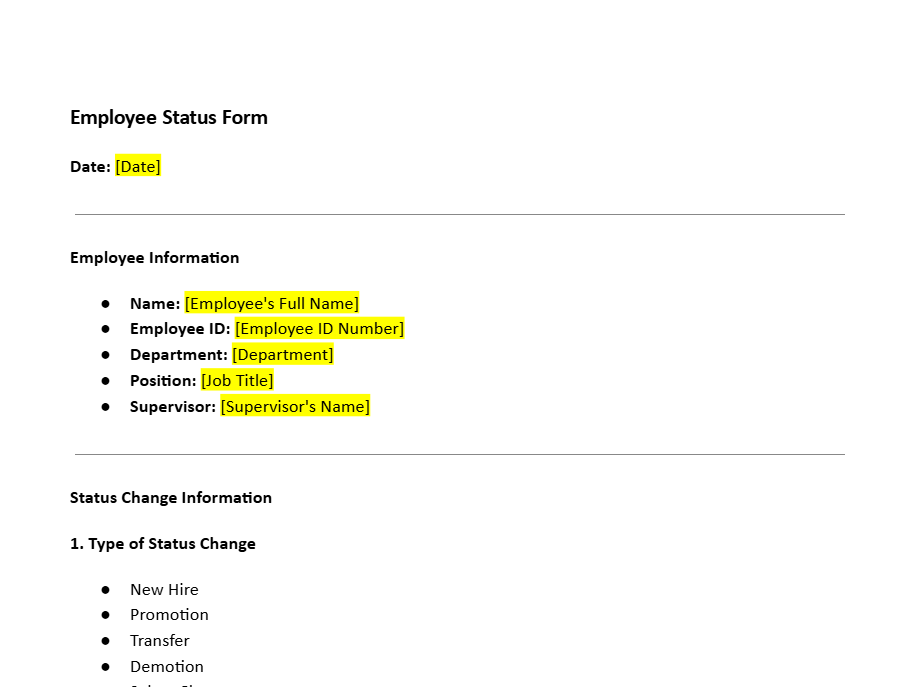
Employee Information Section
Every employee change of status form begins with core employee information. This includes the employee’s full name, current job title, department, and often an employee ID number. Additional fields such as email address and contact number may also be included for quick cross-verification.
Accurate identification details reduce back-and-forth between HR, payroll, and managers. Missing or incorrect employee data can lead to processing delays, especially when multiple employees share similar names or work within the same department. A clear employee information section is therefore a non-negotiable part of an effective employment status change form.
Type of Employment Status Change
A dedicated area in the employee status change form outlines the nature of the change being requested. Typical options include:
- Promotion or demotion
- Change in job title or role
- Change in department or reporting manager
- Change in employment status (e.g., part-time to full-time)
- Salary increase or compensation revision
- Leave of absence, suspension, or return from leave
- Rehire of a former employee
Clearly defining the type of change prevents confusion and ensures that the appropriate workflows, approvals, and system updates are triggered. For new hires, this section clarifies role details and departmental allocation. Companies can customize this part of the HR status change form template for different employment categories, so all changes are captured consistently.
Effective Date of Change
Every status change request must specify an effective date, indicating exactly when the change becomes active. This is especially important for payroll changes, benefits eligibility, leave adjustments, and work schedule updates.
A clearly defined effective date helps HR and payroll teams avoid errors, such as paying the wrong salary, applying incorrect tax withholdings, or miscalculating leave balances. Missing or inaccurate dates can delay salary increases, affect bonus calculations, and lead to incorrect tax deductions. A well-structured employee status change form template makes the effective date field mandatory, reducing the risk of such issues.
Compensation and Payroll Adjustments
The compensation section of the employment status change form records any salary changes, bonuses, allowances, or changes in pay frequency. HR teams use this section to update payroll systems so that the correct amount is paid in the upcoming cycle and any arrears are computed accurately.
Using a standardized format for payroll changes prevents mistakes, keeps payment records aligned with company policy and labor law requirements, and simplifies future audits. When integrated with payroll software, a digital employee status change form can even trigger automated updates, reducing the risk of manual data-entry errors.
Benefits of Implementing an Employee Status Change Form
Most job changes involve multiple checkpoints—manager recommendation, HR review, payroll updates, and sometimes legal review. A structured employee change of status form ensures that each of these steps is documented and completed in sequence, minimizing administrative back-and-forth.
For rehires, HR must verify past tenure, previous salary, performance history, and re-employment eligibility. The same document can also trigger notifications to IT, admin, and finance, so email IDs, access cards, and system rights are updated on time. Without a standard employee status change form process, important updates may be delayed or missed entirely.
Emergency Contact and Direct Deposit Updates
Status changes are often an opportunity to confirm or update an employee’s emergency contacts and direct deposit details. Up-to-date emergency contacts help HR act quickly in cases of medical incidents or urgent matters involving the employee.
Similarly, capturing changes in bank details within the employment status change form ensures direct deposits are sent to the right account. Proper documentation protects the organization from payment delays, misrouted funds, and potential disputes, while keeping banking information aligned with regulatory and internal security requirements.
Performance Evaluations and Approval Signatures
Many organizations link promotions, role changes, and salary revisions to formal performance evaluations. A comprehensive employee status change form template therefore includes fields for performance references, rating summaries, or links to appraisal documents.
Manager and HR approval signatures are critical to make any change official. Signature and date fields for department heads, HR, and finance teams create a traceable approval trail. This prevents unauthorized changes and ensures that every modification in employment status is backed by the correct authority and documentation.
Integration with Digital HR Systems
Modern HR teams are moving away from paper forms and email chains to digital workflows. A digitized employee status change form can be integrated with HRIS, payroll, and time-tracking systems, allowing changes to propagate automatically across platforms.
Instead of managing scattered Excel sheets, HR can maintain a centralized, searchable record of all employment changes. A unified employee status change form template supports real-time tracking, automated approval flows, and secure cloud storage for audit and compliance needs.
With proper digital tracking, organizations reduce payroll inconsistencies, avoid tax errors, and reduce the risk of employment status misclassification. Missing documentation no longer delays salary increases or benefits adjustments because every change is logged and trackable in your HR system.
Accuracy in Payroll and Benefits Administration
Any change in employment status—such as a move from part-time to full-time—has a direct impact on compensation, tax withholdings, and benefit eligibility. A detailed employment status change form forces clarity around these shifts so HR and payroll can update systems correctly.
Documenting these updates in a structured template helps prevent underpayments, overpayments, and misapplied benefits. It also reduces the chances of tax-related discrepancies that can create financial stress for both employees and the organization.
Adherence to Corporate Policies and Labor Laws
Companies are responsible for accurately recording changes to employment, wages, and job responsibilities. A well-documented employee status change form helps demonstrate due process during audits, inspections, or legal reviews.
By standardizing how salary increases, job title changes, direct deposit revisions, and transfers are recorded, HR teams can show that each change followed internal rules and complied with labor regulations. This reduces the organization’s exposure to fines, penalties, and legal disputes.
Accurate Record Keeping and HR Coordination
A consistent HR status change form also improves coordination between HR, payroll, and management. Each form becomes a single source of truth for the change requested, approved, and implemented, reducing misunderstandings and miscommunication.
Organizations that move to an online employee status tracking system can monitor job changes in real time, generate reports easily, and maintain clean history logs for each employee. This visibility makes workforce planning, budgeting, and compliance reporting significantly easier.
Tracking Career Progress and Corporate Changes
An employee change of status form effectively acts as a timeline of an employee’s journey within the company. Every promotion, lateral move, salary revision, and manager change is recorded, helping HR and leadership understand career progression patterns across the organization.
Over time, this structured record makes it easier to identify high-potential employees, justify promotions with data, and ensure fairness and transparency across teams. It also gives leadership a clear view of how the workforce is evolving with organizational needs.
Standardized Internal Approvals
Most job changes require multiple approvals—from line managers, HR, and often finance. A standardized employee status change form template captures all these sign-offs in a single place, reducing the risk of informal or undocumented decisions.
Verbal agreements and scattered email approvals are difficult to track and can cause inconsistencies, especially when it comes to compensation adjustments. A formatted request form clearly states the requested change, the effective date, and the necessary approvals, creating a transparent, traceable process for HR teams.
Employee Onboarding and Exit Documentation
A well-structured employment status change form is also useful at the start and end of the employee lifecycle. For new hires, the template captures starting role, salary, probation terms, and employment status. For resignations, terminations, or retirements, the same document can be used to record the final working day, settlement details, and status updates in the HR system.
Legal and Regulatory Compliance
Many industries require employers to preserve detailed employee records, including job changes and wage revisions, for specified periods. A standardized employee status change form helps HR teams demonstrate compliance with labor, tax, and industry-specific regulations.
In case of employment disputes, properly completed forms act as reliable evidence that due process was followed. Without this documentation, organizations may struggle to defend their decisions and may face penalties, legal challenges, or adverse audit findings.
Workflow Improvement and Digital Tracking
When organizations move their employee status change form template into a digital environment—such as an HR portal or document automation platform—they unlock major workflow improvements. HR teams can submit, review, and approve changes online, significantly reducing paper use and manual tracking.
Digital workflows can automatically send reminders for pending approvals, flag incomplete information, and prevent duplicate data entry. Linking the form to HR and payroll systems ensures that once a change is approved, all connected systems are updated correctly and consistently.
This structured, digital-first approach improves data accuracy, lowers the risk of non-compliance, and enhances overall HR efficiency. A modern, well-designed employee status change form is therefore a key building block for streamlined internal operations.
Why Your Systems Need an Employee Status Change Form Template
A standardized employee status change form template ensures that every employment update, large or small, is handled in a consistent and professional way. HR teams no longer need to reinvent the document for each promotion, transfer, or salary update—saving time, reducing admin overhead, and lowering the risk of mistakes.
With a template-based process, HR can quickly capture the right information, route the form to the right approvers, and store it in the right system. When combined with digital tools and online forms, organizations benefit from automated workflows, lower paper usage, and cleaner, more reliable employee data.
For growing businesses, a standardized employment status change form is not just a document—it is a control mechanism that supports compliance, clarity, and confidence in every HR decision.
Download an Employee Status Change Form Template with a Free Trial of FreshDox
If you want to simplify HR workflows and reduce documentation errors, start by using a professional employee status change form template. With FreshDox, you can download a ready-made, fully editable form built by legal and HR experts and adapt it to your internal policies in minutes.
Sign up for a Basic or Premium account to unlock a 7-day free trial of FreshDox and full access to our entire library of business and HR templates. Download the employee status change form in Word or PDF format, customize it with your logo and fields, and integrate it into your onboarding, payroll, and HR processes.
Create your account on FreshDox today, streamline how you manage employment changes, and give your HR team a reliable, compliant, and easy-to-use employee status change form template that works from day one.
Popular searches:
- Employee Status Change Form Template pdf
- Employee Status Change Form Template sample
- Employee Status Change Form Template download
- Employee Status Change Form Template format
- Employee Status Change Form Template template
- Employee Status Change Form Template word
- Employee Status Change Form Template free

 Download Word Template
 Download PDF Template
Related Templates
Discover more templates that align with your needs and preferences.








Ready to Sign Up?
Start your 7-day free trial and access professionally drafted legal documents built for business use.
- Cancel any time
- 7-day free trial
- From 300+ Customer Reviews
